

As search engines increasingly prioritise user experience, having core web vitals explained clearly is no longer just a technical exercise. It is the dividing line between local businesses that capture traffic and those that lose impatient customers to competitors.
We have seen countless Malaysian SMEs struggle with dropping rankings simply because their websites feel slow, an observation we have tracked closely since founding Adam SEO in 2011.
This guide is part of our Technical SEO services hub to help you understand the data. We frequently share these exact principles when conducting a technical SEO audit for our clients.
Let us look at the metrics that actually matter and explore a few practical ways to respond.
Core web vitals explained: Measuring the experience that matters
Getting core web vitals explained is essential because they are Google’s specific way of measuring the real-world experience of your pages. They focus heavily on loading speed, responsiveness, and visual stability.
We frequently remind our clients that Google gathers this data directly from actual users through the Chrome User Experience Report (CrUX). This means your scores reflect how real people in Malaysia experience your site on their specific devices and networks.
Here is why ignoring these metrics hurts your bottom line:
- Mobile Dominance: Recent 2026 data shows over 70% of e-commerce traffic originates from mobile devices.
- Strict Benchmarks: Google evaluates your site based on the 75th percentile of user visits.
- Direct Revenue Impact: A simple one-second delay in mobile load times can cause a 7% reduction in conversions.
Three distinct metrics make up this vital set.
The three metrics
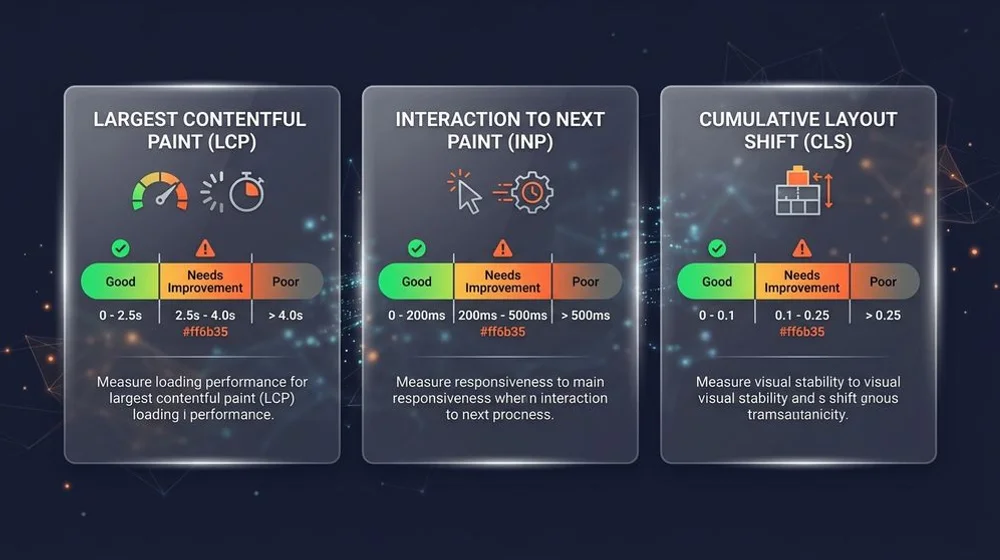
Understanding LCP, INP, CLS is crucial because they are the three performance pillars that determine your overall score. The core web vitals thresholds for passing are strict, requiring your site to load quickly, react instantly, and remain visually stable.
Understanding the specific role of each metric helps you target your optimisation efforts:
- LCP (Largest Contentful Paint) measures loading performance. It marks the exact moment the main content of the page becomes visible, and you should aim for under 2.5 seconds.
- INP (Interaction to Next Paint) measures responsiveness. It captures how quickly the page reacts when a user interacts, and you should aim for under 200 milliseconds. Google officially introduced this to replace First Input Delay (FID) in March 2024.
- CLS (Cumulative Layout Shift) measures visual stability. It quantifies how much the page elements jump around as resources load, and you should aim for under 0.1.
We find that meeting these targets on desktop is relatively straightforward. However, achieving them on mobile requires active effort, especially since many users across Malaysia still rely on fluctuating mobile network connections.
Pass all three metrics, and you deliver the smooth experience that both users and search engines reward.
Common causes and fixes
Each Core Web Vitals metric has typical technical culprits that drag down your scores. Identifying these specific bottlenecks is the first step in improving your website’s performance.
We regularly audit websites built on popular platforms like Shopify and WooCommerce, and we see the same repeated mistakes. Let us break down the common issues and the most effective solutions.
Fixing LCP Delays
LCP is often hurt by large unoptimised images, slow servers, and render-blocking resources. If your primary product photo takes too long to appear, your score will suffer.
Fixes include compressing graphics into modern formats like WebP and upgrading to a regional Malaysian hosting environment. You must also prioritise loading critical CSS first while delaying non-essential scripts until after the main content renders.
Resolving INP Frustrations
INP suffers heavily from bloated JavaScript that ties up the browser’s main thread. This is a very common issue on Malaysian e-commerce sites featuring large Product Listing Pages (PLPs) or complex mega-menus.
When a customer taps a product filter and the page freezes, your INP score drops. Our team typically fixes this by reducing the overall JavaScript payload, deferring third-party scripts like live chat widgets, and breaking up long tasks to streamline interactivity.
Stabilising CLS Issues
CLS comes from images and advertisements loading without reserved space, or custom fonts that swap late in the rendering process. This causes the text a user is reading to suddenly jump down the screen.
We always recommend setting explicit width and height attributes for all media elements. Other fixes include preloading your custom fonts and stabilising the page layout to ensure ad banners do not push content around as they load.
Why they affect rankings and conversions
Core Web Vitals sit squarely at the intersection of search engine visibility and actual business revenue. A slow, janky page frustrates visitors, leading to higher bounce rates and fewer sales, while simultaneously weakening your ranking signals in Google.
We view website performance as a critical business issue rather than a mere technical detail. Improving your vitals lifts both traffic and revenue at the same time.
“A 2026 study showed that pages loading in one second boast a conversion rate three times higher than pages taking five seconds.”
The way a site is built has a direct impact here, as covered in how web design affects SEO. Consider the financial impact of a slow checkout process.
In fact, a 2022 industry report indicated that 53% of Malaysian online shoppers will abandon a purchase entirely if the checkout takes more than three minutes. You can clearly see the contrast in outcomes when comparing optimal and poor performance:
| Performance Level | Average LCP Speed | Conversion Impact | User Behaviour |
|---|---|---|---|
| Optimised (Passing) | Under 2.5s | High conversion rate | Engaged browsing |
| Poor (Failing) | Over 4.0s | Significant revenue drop | Immediate abandonment |
Improve your scores
Core Web Vitals consistently reward sites that take user performance seriously. The financial gains show up clearly in both improved search rankings and increased local sales.
We understand that having core web vitals explained and diagnosing specific server delays can feel overwhelming for business owners. Taking action on these metrics is the best way to protect your digital presence.
To find your specific bottlenecks and the highest-impact fixes, Adam SEO offers a free discovery audit with no obligation.